Subjects
Grades
An umbra is an area that is not directly illuminated by a light source because an opaque object prevents the passage of light rays.
A penumbra is an area that is partially illuminated by a light source. Some of the light rays are blocked by an opaque object, but some rays can still illuminate the surface.
Finally, a light area is one that is totally illuminated by a light source. No light ray is blocked from illuminating this area.
The formation of umbra and penumbra areas initially depends on the type of light source chosen.
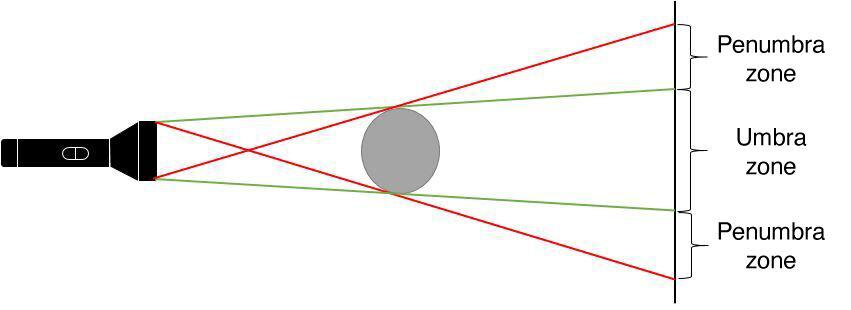
To determine the area of umbra and penumbra formed by an extended light source illuminating an opaque object, four light rays must be drawn.
Starting from the source’s upper end point, a first ray of light is drawn by touching the upper part of the opaque object until it hits the screen. A similar radius should be drawn for the lower end point of the source. In the diagram below, these rays are represented by the color green. The area created between these rays represents the umbra area formed by the object.
Starting from the upper end point of the source, a light ray is traced by touching the lower end point of the opaque object until it hits the screen. A similar ray should be drawn for the source’s lower end point, which will touch the upper end of the opaque object until it hits the screen. These rays appear in red on the diagram below. The area formed between the green and the red rays represents the penumbra area.
All the zones which are on either side of the penumbra are totally illuminated: they are the light zones.

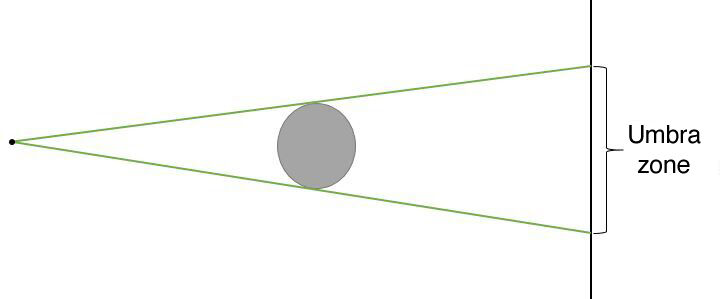
A point light source does not allow the formation of a penumbra. Only umbra zones can be observed. To determine the umbra zone formed by a point light source illuminating an opaque object, only two light rays need to be drawn.
Starting from the source’s upper end point, a first ray of light is drawn by touching the upper part of the opaque object until it hits the screen. A similar radius should be drawn for the source’s lower end point. These rays are represented by the color green in the diagram below. The area formed between these rays represents the umbra area formed by the object.
The remaining opaque object does not prevent the light rays from passing though: therefore, a light area is present on either side of the umbra area.
A few factors can impact the size of the umbra formed by an object. These are as follows:
the type of light source used: an extended light source produces a larger area of umbra and penumbra than a point light source;
Tthe position of the object relative to the light source: by bringing the object closer to the light source, the umbra and penumbra will increase;
the position of the object relative to the screen: by moving the screen away from the object, the umbra and penumbra areas will increase.
To achieve a more clearly defined umbra, it is important to ensure that the penumbra areas are reduced, or even eliminated, as much as possible. To do this, the following is required:
use a point source;
move the light source as far away as possible from the object;
bring the object as close as possible to the screen.